#138 — Convert Certain Columns of the Same Row, as Group Members, to Multiple Rows

Problem description & analysis:
Here below is a data table:
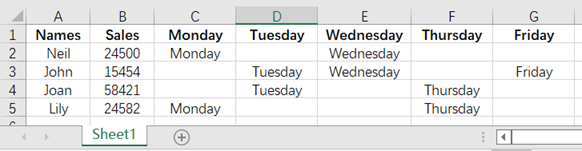
Task: Now we want to convert it to a row-based table, like this:
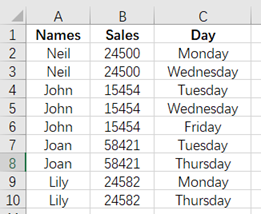
Solution:
Use SPL XLL and enter the following code:
=spl("=E(?1).pivot@r(Names,Sales;Weekday,Day).new(Names,Sales,Day).select(Day)",Sheet1!A1:G5)
Code explanation: Perform the row-column transposition on the data. The option @r means column-to-row. The Names and Sales columns are used as the base column, other column names are transferred and used as the values in the Weekday column, and the values in other columns are transferred and used as the values in column Day.
Select the columns Names, Sales and Day, and the rows whose value in column Day is nonnull.
Download esProc Desktop for FREE and boost productivity today!!! 🚀✨⬇️
✨SPL download address: esProc Desktop FREE Download
✨Plugin Installation Method: SPL XLL Installation and Configuration
✨References to other rich Excel operation cases: Desktop and Excel Data Processing Cases
✨YouTube FREE courses: SPL Programming


