#144 — Insert Row after Specific Row
Published
•1 min read
Problem description & analysis:
Here below is a data table:
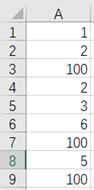
Task: Insert one row after the number 100, and fill in a001, a002, … in turn, like this:
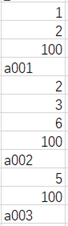
Solution:
Use SPL XLL and enter the following code:
=spl("=E@b(?1).group@i(~[-1].#1==100).(~|new(string(#,""a000""):_1)).conj()",A1:A9)
Code explanation: Group the data. When the value in column A of the previous row is 100, create a new group.
Loop through each group, insert a record at the end of the group, whose value of the first column is the current group number #, formatted with “a000”.
Download esProc Desktop for FREE and simplify your workflow with SPL XLL!!! 🚀✨⬇️
SPL download address: esProc Desktop FREE Download
Plugin Installation Method: SPL XLL Installation and Configuration
References to other rich Excel operation cases: Desktop and Excel Data Processing Cases
YouTube FREE courses: SPL Programming


