#90 — Generate Numbers in Each Group
Published
•1 min read
Problem description & analysis:
Here below is the student data table:
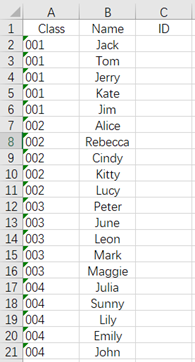
Task: Now we want to create student IDs for every student. The student ID should be class number + student’s serial number in the class, and the serial number should be two-digit (to calculate in cell C1).
Solution:
Use SPL XLL and the code is as follows:
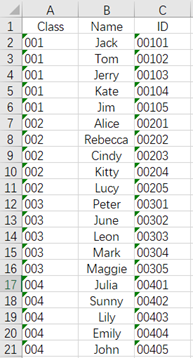
=spl("=E(?1).group(Class).(~.(Class+string(#,""00""))).conj().new(~:ID)",A1:B21)
The results are shown below:
Download esProc Desktop for FREE and streamline datasheets with ease!!! 🚀🔥⬇️
✨SPL download address: esProc Desktop FREE Download
✨Plugin Installation Method: SPL XLL Installation and Configuration
✨References to other rich Excel operation cases: Desktop and Excel Data Processing Cases
✨YouTube FREE courses: SPL Programming


