#81 — Accumulate Data in Each Group
Published
•1 min read
Problem description & analysis:
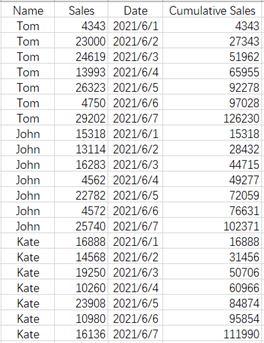
There is a sales data table:
Task: Calculate the cumulative sales of each person.
Solution:
Use SPL XLL and the code is as follows (to calculate in cell D1):
=spl("=E(?1).new(cum(~~+Sales;Name):'Cumulative Sales')",A1:C22)
cum(x; Gi,…) is an iteration function, used in the loop function; x is an expression containing; represents the cumulative value; Gi is an ordered column, and group by Gi and accumulates within the group.
The results are shown below:
Download esProc Desktop for FREE and see how it works for you!!! 🚀🔥⬇️
✨SPL download address: esProc Desktop FREE Download
✨Plugin Installation Method: SPL XLL Installation and Configuration
✨References to other rich Excel operation cases: Desktop and Excel Data Processing Cases
✨YouTube FREE courses: SPL Programming


